If you would like to download
my Codeplug, CSV file, the Chirp IMG file (for the Yaesu FT3R radio), plus my "BACKUP.DAT" and
"MEMORY.DAT" files click
HERE.
Before you put the files on your MicroSD card make sure you back them up to
another location and/or rename them. Then you can copy the "BACKUP.DAT" and "MEMORY.DAT" files to the MicroSD
card in your radio and
restore the files. The "BACKUP.DAT" file goes in the "BACKUP" folder and the "MEMORY.DAT"
file goes in the "MEMORY CH" folder.
*
I talked to a Tech Support person at RT Systems and he informed me that the "BACKUP.DAT"
contains ALL the programming coding (with the exceptions below).
The "MEMORY.DAT" only contains the Memory Channels.
So, if you want to restore your radio's Codeplug, you only need to restore "BACKUP.DAT."
*
On April 28, 2026, I was able to install the Codeplug from my MicroSD card and a
MicroSD card Codeplug created by the RT Systems software into someone else's
radio.
First, the good news, it keeps your call sign.
The other good news is, it creates all the channel banks and puts the memory
channels in the proper places.
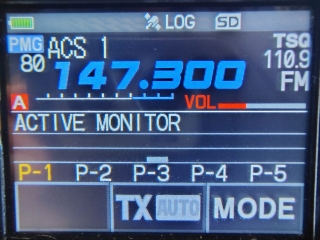
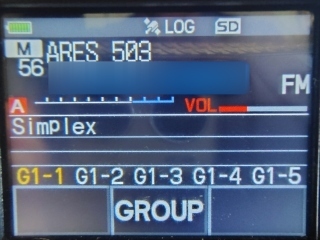
Now for the bad news, the Yaesu radio and RT systems
backup on the microSD card, does not create or restore PMG, CAM, or channel bank
names.
So you will have to enter the bank names manually in the radio or buy the RT
Systems software and cable to program the radio.
If you decide to enter them manually, here they are:
1-ARES NW, 2-LAFD ACS, 3-PAPA, 4-CALNET, 5-FRS GMRS, 6-FREQUENT, 7-FIRE,
8-FUSION, and I added this later 9-DIRECT and 10-Winsys.

You will also have to manually install your own PMG and CAM memory channel
choices into the radio or buy the RT Systems software and cable to program the
radio.
I highly recommend buying the
RT
Systems software and cable to program the radio so you don't have to do all
this programming manually.
Here is the link to buy
RT
systems software and cable.
*
My Codeplug contains repeaters
for DARN (ARES), Calnet, and the Papa System.
*
Besides being the repeater system we use for our weekly Nets, the Disaster Amateur Radio Network (DARN)
is a friendly, member-supported, closed repeater network consisting of 45+
repeaters on 6-Meters, 2-Meters, 220MHz, 440MHz, and 1200MHz, which are
primarily interconnected utilizing full-duplex RF links. This linked repeater
network covers most of Southern California, and extends into portions of Lake
Tahoe, Colorado, and Florida.
Try it out on trial basis and see if you like it. If you find you like it,
please click here and make a
suggested donation
for membership.
*
The Calnet Repeater
Group has 21 Analog FM covering from San Diego to San Francisco. They also
have a few C4FM repeaters on Oat and Sunset Peak. The Loop repeater covers the
San Fernando Valley, areas north and south. Try it out on trial basis and see if
you like it. They have a weekly net every Wednesday at 8:00pm local. If you find
you like it, please click here and make a
suggested donation
for membership.
*
The
PAPA System is
a member-supported wide-area amateur radio network of inter-linked Analog FM,
D-STAR, DMR, and P25 repeaters, providing extensive coverage of the Southern
California region and beyond. We have reliable communications from the border
with Mexico to north of Santa Barbara, and from the Arizona border to “maritime
mobile” well out into the Pacific Ocean.
The PAPA System has about 40 Analog FM repeaters. The Oat repeater covers the San Fernando Valley, areas north and south.
Try it out on trial basis and see if you like it. If you find you like it,
please click here and make a
suggested donation for membership.
*
The WIN System is
a member-supported wide-area amateur radio network of inter-linked Analog FM
repeaters, providing extensive coverage of the Southern California region and
beyond.
The WIN System has 49 Analog FM repeaters. The Angeles repeater covers the San Fernando Valley, areas north and south.
Try it out on trial basis and see if you like it. If you find you like it,
please click here and make a
suggested donation for membership.
|
This is now
not needed, but here is how to put your call sign into the radio.
Make sure you change my "Callsign" that are in the radio,
twice. To change the radio to your call sign, you need to do it
twice, start by long pressing "Fmenu,"
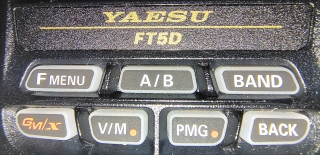
APRS,
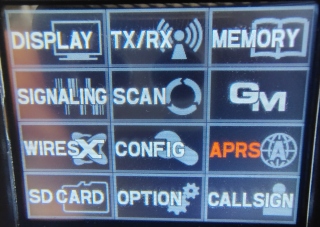
then choose #23. Then press "BACK." Then, long press Fmenu, again
and touch CALLSIGN in the bottom right corner of the screen.
Pro tip: After you enter your call sign, you can
add extra characters. If your call sign is W1AW you could add W1AW-ARRL or
W1AW-DOUG.
Then press "BACK."
*
After you change my call sign to your call sign, back up the radio to the
MicroSD card. Long press "Fmenu"
choose "SD Card"
Back up both the "#1 BACKUP" file and the "#3 MEMORY CH" files. Turn off
the radio, remove the MicroSD card, and make a copy of the files somewhere. |
*
BACK